






:quality(85):upscale()/2026/04/10/039/n/1922283/cb3481e569d98e495097f0.31125477_.jpg)
:quality(85):upscale()/2026/03/16/901/n/1922398/7098afdb69b86a52587585.46389067_.jpg)
:quality(85):upscale()/2025/08/14/650/n/1922283/470aeb83689df49cdc1bb6.14084110_.jpg)
:quality(85):upscale()/2023/10/03/668/n/1922283/1f15c8a9651c2d209e5eb5.32783075_.jpg)
:quality(85):upscale()/2025/09/09/891/n/1922283/7222624268c08ccba1c9a3.01436482_.png)







AI Video Maker: A Practical Guide to Creating Cinematic Videos with SuperMaker AI
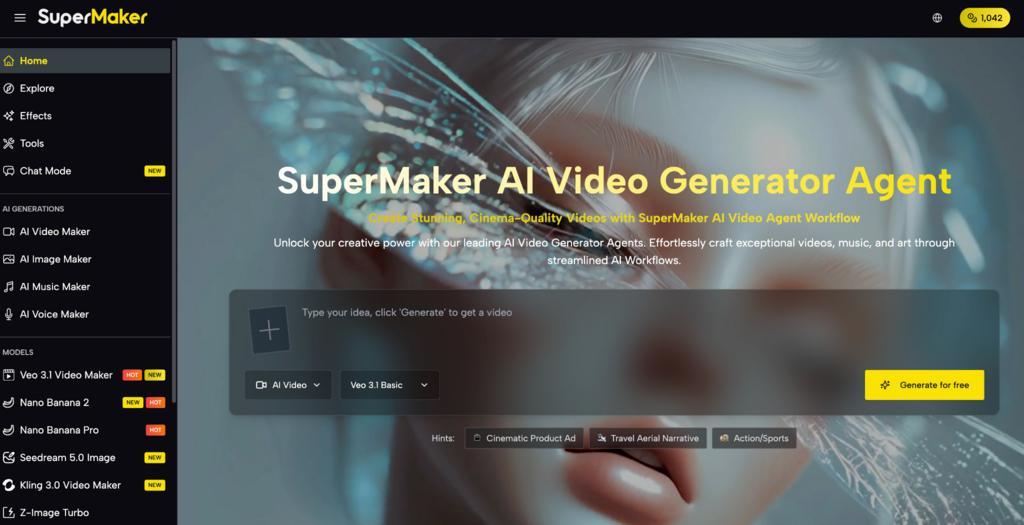
Video content now drives more engagement, conversions, and audience retention than any other content format — yet for most creators and businesses, professional-level video production has remained out of reach due to cost, complexity, and time. That gap is closing fast.
An AI Video Maker like SuperMaker AI puts the full power of cinematic video production into a single browser-based platform, requiring no downloads, no prior editing experience, and no large production budget. SuperMaker AI transforms a plain text prompt or static image into a polished, professional-grade video — complete with synchronized audio, voiceovers, and music — in minutes. Whether you are building a marketing campaign, launching a YouTube channel, or developing educational content, the way video gets made has fundamentally changed.
Core Features of SuperMaker AI Video Maker
Supermaker AI Video Maker is not a single-function clip generator. It is a full production environment built around a sophisticated AI Video Generator engine, with every stage of the creative workflow — from scripting to post-production — integrated into one place.
Text-to-Video and Image-to-Video Generation
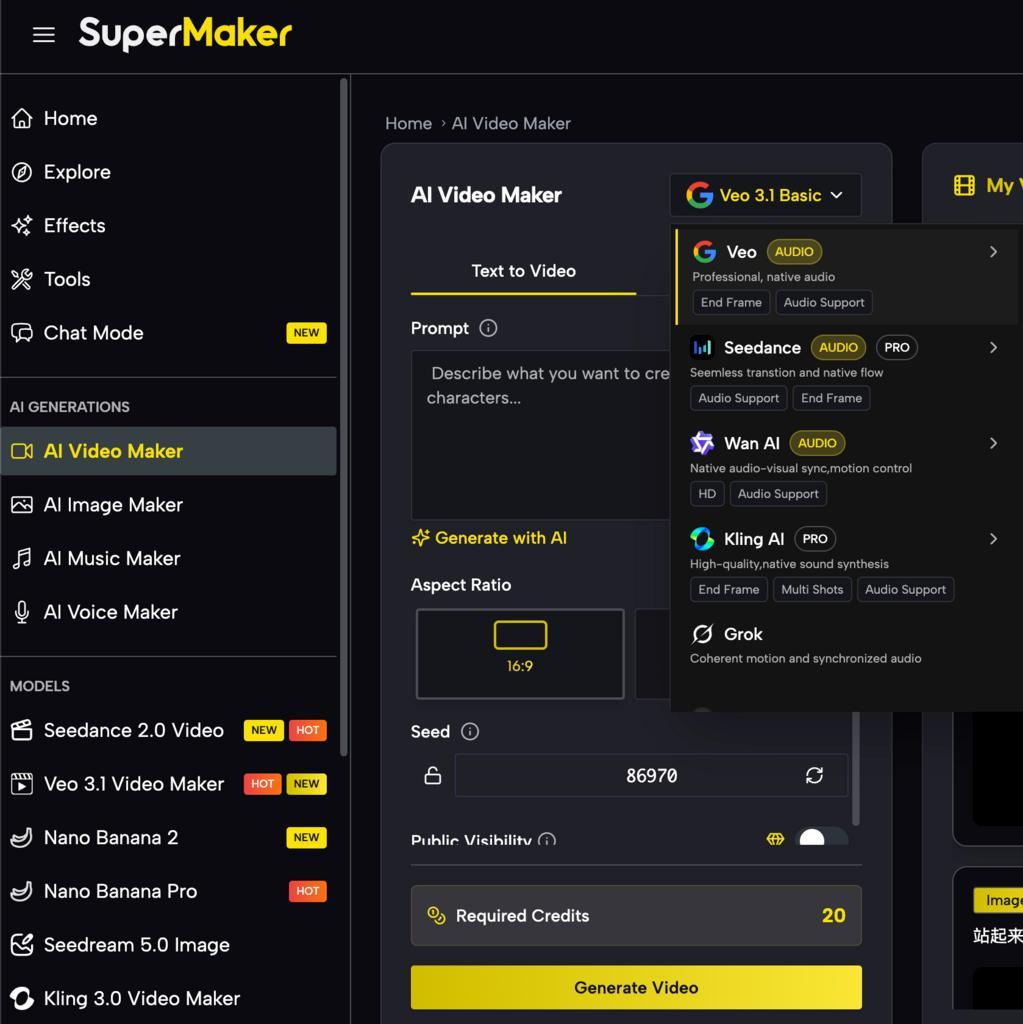
The two primary input methods give users maximum flexibility. Text-to-Video converts written scripts, article summaries, or descriptive prompts directly into dynamic video scenes with matching visuals and motion. Image-to-Video animates static photos or graphics into fluid video sequences — particularly useful for product showcases, concept art, and social content derived from existing visual assets. Both pipelines are powered by industry-leading models including Seedance 2.0, Veo 3.1 and Kling 3.0, giving users access to cinema-grade output that previously required specialist rendering software.
Intelligent Scriptwriting and Storyboarding
Before a single frame is generated, SuperMaker AI helps you plan the narrative. The integrated AI scriptwriting tool converts a rough idea into a structured script, which the storyboarding system then breaks into individual scene cards with visual previews. This pre-production workflow — normally a multi-day process in traditional video production — is compressed into minutes. For long-form content like web series episodes, short films, or corporate training videos, this consistency across scenes is a significant advantage.
Synchronized Audio: Voice, Music, and Sound Effects
Most competing generators produce silent clips. SuperMaker AI’s AI Voice Maker generates natural, multi-language voiceovers that automatically sync to the pacing of each scene. The AI Music Maker composes original, royalty-free background scores matched to the tone and mood of the video. A dedicated sound effects layer adds ambient audio and dynamic SFX for a complete cinematic soundscape — all within the same platform, without requiring third-party audio tools.
Advanced Editing, Effects, and Workflow Automation
Post-production tools include magic erase, smart uncrop, photo restoration, green screen removal, AI-assisted color correction, and a lip sync video generator. Customizable AI workflows allow power users to chain tasks together — scriptwriting, scene generation, voiceover, music, and final assembly — into a single automated pipeline. An Assets Library with versioning keeps every generated video, image, audio file, and script organized and reusable across projects.
How to Use SuperMaker AI Video Maker
The production workflow follows four clearly defined steps, designed to be accessible to first-time users while offering enough depth for professional-grade productions.
Step 1: Describe or Upload Your Idea
Enter a detailed text prompt describing your scene, tone, and setting — or upload a reference image or photo to feed the Image-to-Video pipeline. The more specific your input, the more intentional the output.
Step 2: Customize Your Settings
Select your preferred video model (Seedance, Veo, Kling, Sora, and others), choose resolution and aspect ratio appropriate for your target platform, and configure style preferences to match your brand or creative direction.
Step 3: Generate
Click “Generate” and the AI Video Generator engine processes your input — crafting scenes, applying motion, and structuring the visual narrative. Most generations complete within seconds to a few minutes depending on complexity.
Step 4: Export or Enhance
Download your video directly as an MP4 for immediate use, or extend the project by adding AI-generated voiceovers via AI Voice Maker, original music via AI Music Maker, additional scenes, and post-production effects — all without leaving the platform.
Best Use Cases and Practical Scenarios
- Marketing video ads — Generate high-converting promotional and product demo videos from ad copy or product images at scale
- Social media short-form content — Rapidly produce platform-optimized clips for TikTok, Instagram Reels, YouTube Shorts, and Facebook Stories
- E-learning and training modules — Convert text-based lesson plans or diagrams into animated educational videos that improve student engagement
- Corporate presentations — Summarize reports, proposals, or data into polished visual presentations with professional narration
- Short film and episodic content — Develop full narrative productions from script through storyboard to rendered scenes with character consistency
- Personal creative projects — Turn poems, travel photos, or personal stories into cinematic visual narratives without any editing experience
AI Video Maker Platform Comparison
Tool |
Best For |
Key Strength |
Free Access |
SuperMaker AI |
End-to-end video production | All-in-one: video + voice + music + storyboarding in one workflow | Yes — no login required |
Runway ML |
Visual effects and style transfer | Advanced motion control and inpainting | Limited free tier |
Canva Video |
Quick social media clips | Easy template-based design interface | Yes — with limitations |
| Sora (OpenAI) | High-fidelity short clips | Exceptional visual realism | Limited availability |
SuperMaker AI’s primary competitive advantage is its integrated production depth — where most tools handle one stage of creation, SuperMaker covers the entire pipeline from concept to final export.
FAQ About AI Video Maker
What is an AI Video Maker?
An AI Video Maker is a platform that uses artificial intelligence to transform text prompts or static images into fully rendered video content — including visuals, motion, audio, and post-production — without requiring manual filming or traditional editing software.
Is SuperMaker AI Video Maker free to use?
Yes. SuperMaker AI offers a free plan that covers core Text-to-Video and Image-to-Video features, and users can begin generating videos with no sign-up or login required. Premium subscription tiers unlock advanced models, higher usage limits, and additional production tools.
Can I use videos created with SuperMaker commercially?
According to SuperMaker AI’s terms, videos generated under paid subscription plans come with full commercial rights. If you plan to use content for client work, advertising, or monetized channels, a premium plan is recommended. Always review the current terms of service for specific licensing details.
What makes SuperMaker AI different from other video generators?
SuperMaker AI’s core differentiator is its complete production workflow — integrating scriptwriting, storyboarding, multi-model video generation (Seedance, Veo, Kling, Sora), AI voiceover, royalty-free music creation, advanced editing tools, and asset management into a single platform. Most alternatives handle one or two of these stages; SuperMaker handles all of them.
Conclusion
AI-powered video creation is no longer a novelty — it is a practical, scalable solution for anyone who needs to produce professional video content consistently and efficiently. SuperMaker AI has built one of the most complete platforms in this space, combining multi-model video generation with integrated audio, intelligent pre-production tools, and a seamless end-to-end workflow. If you are ready to produce cinematic-quality video without the traditional cost or complexity, start exploring SuperMaker AI’s free plan today and see how quickly your first video comes to life.
The post AI Video Maker: A Practical Guide to Creating Cinematic Videos with SuperMaker AI appeared first on Entrepreneurship Life.





:quality(85):upscale()/2025/10/09/670/n/1922283/00b944c868e7cf4f7b79b3.95741067_.jpg)